HyperClean AI
- 4.3
- Rating
- 1.00M
- Installs
- Free
- Price

 Analysis by App-foxy
My phone’s storage problem rarely arrives as one dramatic event. It builds quietly through screenshots, repeated photos, forgotten downloads, short videos sent in chats, and files I no longer recognize. By the time I notice, the warning is already affecting everyday use. That is the problem HyperClean AI is designed to address: it brings duplicate-photo detection, video cleanup, and junk-file removal into one tools app instead of making me search through several unrelated menus.
HyperClean AI is a free storage-cleaning app from YIXIANG, with optional in-app purchases priced from $6.99 to $39.99 per item. It is listed for Everyone and works on Android 6.0 or later. The important question is not whether a cleaner can display a large amount of recoverable space. The useful question is whether it helps me decide what can safely go, quickly enough that I will actually finish the job. In my experience, that is where this app is most interesting.
Why this kind of cleaner can save real time
Manual cleanup is deceptively expensive. I can open the gallery and delete obvious mistakes, but duplicates are harder to spot when they have different filenames, slightly different crops, or were saved from separate conversations. Videos create another problem because a few large clips can matter more than hundreds of small images. Junk files add yet another layer: they are easy to ignore because they are not visible in the normal photo timeline.
You May Also Like

 Blood Strike: 2.5 Anniversary
Blood Strike’s Loadouts Turn Every Drop Into a Tactical Gamble
A close look at Blood Strike’s custom loadouts: how fast access to signature weapons reshapes its battle royale rhythm, rewards preparation, and narrows the gap between fights.

 Pandora - Music & Podcasts
Pandora’s Music Is Easy to Start, but Harder to Recover
Pandora’s strength is its low-effort path from a seed to a station. Its weak spot is how much confidence it asks you to place in connection, setup, and quiet recovery.

 8 Ball Pool
 Is Built on Rivalries, Rematches, and Routine
A close look at the rivalries, rematches, shared routines, and unanswered safety questions that turn a quick pool match into a persistent mobile community.

 Samsung Music
’s Quiet Strength Is Playing What You Already Own
Its reach comes less from spectacle than from dependable access to a personal library. That simplicity is both the app’s strongest retention engine and its ceiling.

 AccuWeather: Weather Radar
AccuWeather Review: A Quick, Clear Forecast for Everyday Decisions
For everyday plans, the best forecast is the one you can understand quickly. AccuWeather makes rain timing, radar, and local conditions easy to act on, with a few trade-offs.

 Hill Climb Racing
Why Hill Climb Racing Still Turns Crashes Into One More Run
A tiny car, a bumpy hill and one more upgrade: Hill Climb Racing keeps resurfacing because its simple chaos makes every near-miss feel personal.
More From Our News Desk



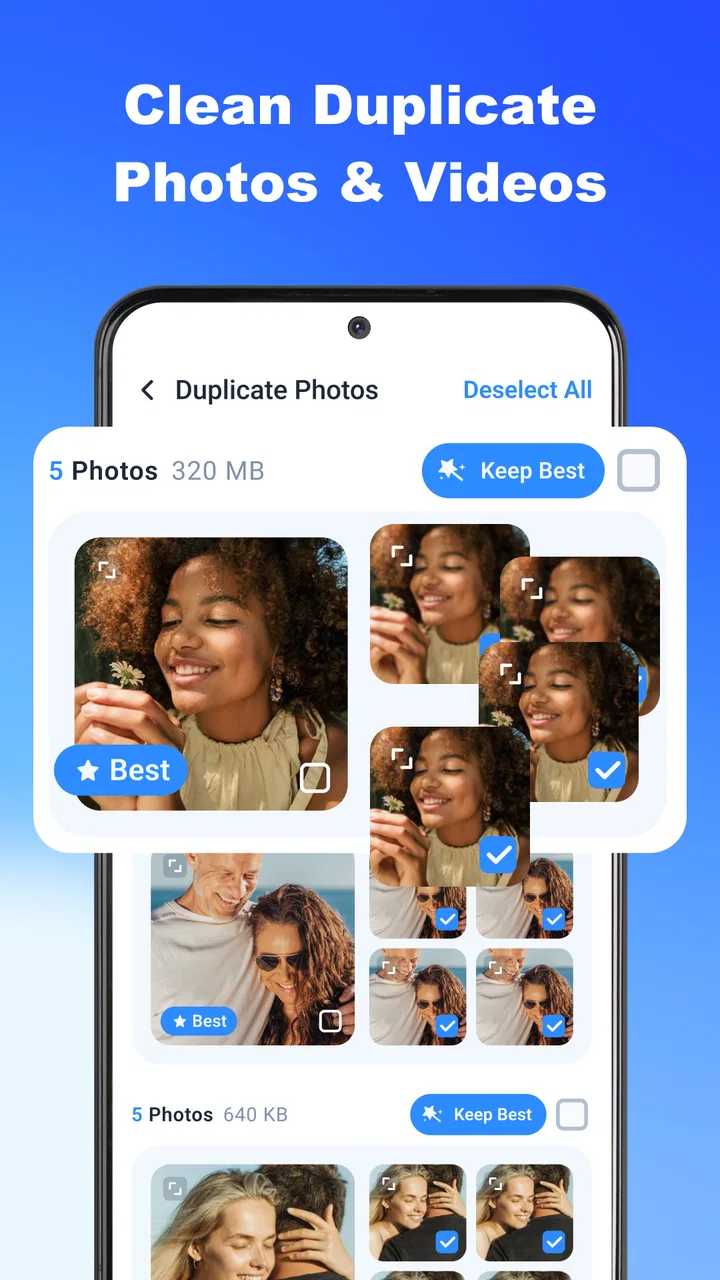
The app’s focus is narrower and more practical than a general file browser. Its store summary centers on using AI to find duplicate photos and videos and clear junk files, while the short description presents it as HyperClean AI. That combination gives the app a clear job: reduce the amount of sorting I have to do before reclaiming space.
I would not treat any storage cleaner as an automatic “delete everything” button. Photos and videos can be personal records, and a visually similar image is not necessarily a disposable copy. The value here is better understood as assisted triage. The app should help me bring likely candidates together, inspect them, and make a decision with less scrolling.
The first setup is useful only if I stay involved
When I begin with a cleaner like this, I prefer a short, deliberate first pass rather than tapping every cleanup option immediately. I start with duplicate photos because they are usually the easiest category to judge. Then I review videos separately, since a duplicate clip can be large but may also contain a moment I want to keep. Junk files come last, after I have seen what the app considers removable.
That order is one of the most useful ways to approach HyperClean AI. It separates personal media from less meaningful clutter and reduces the chance of making a rushed decision. It also gives me a clearer sense of where the storage problem actually comes from. If repeated images are the main issue, I can focus there; if videos dominate, a photo-first cleanup will not solve the underlying problem.
The app is available at no charge, which makes it easy to test without committing money at the start. Optional purchases are part of the experience, so I would pay attention to which actions remain available during normal use before deciding whether an upgrade is worthwhile. A free entry point is helpful, but the practical value depends on whether the cleanup workflow itself feels complete without repeated interruptions.
Because the developer is YIXIANG and the current version is V1.1.21, I would also keep the app updated through the normal store channel. Cleanup tools interact with personal files, so stability matters more here than it might in a casual utility. A failed scan is annoying; a confusing deletion step is much more serious.
How I would handle duplicates without losing the wrong file
Duplicate detection sounds simple until two images are almost, but not completely, identical. A burst of photos may contain several frames that look alike while each captures a slightly different expression. Edited and original versions may also appear together. My rule is to inspect the group rather than selecting every suggested item automatically.
I keep the sharpest original, the version with the best framing, and anything that has obvious personal value. Screenshots of tickets, addresses, receipts, or instructions deserve special care because their usefulness may not be obvious from a thumbnail. I also avoid cleaning an entire category immediately after a scan. Reviewing in smaller batches makes it easier to notice when a supposedly redundant file is actually the one I need.
This is where an AI-assisted tool can save time without replacing judgment. It can narrow a large library into likely duplicates, but I still make the final call. For someone with a very large camera roll, that division of labor is more realistic than expecting a single tap to understand context.
Videos need a different cleanup strategy
Photos encourage quick decisions because thumbnails are easy to compare. Videos are different. A short clip can be emotionally important, and two videos that look similar may have different audio or a different ending. I would therefore review video groups with the playback context in mind, not only their preview images.
A practical routine is to remove obvious accidental recordings first: blank clips, pocket recordings, repeated exports, and videos saved twice from the same conversation. I would leave family events, travel footage, and anything that is difficult to recreate until the end. This approach may recover less space during the first few minutes, but it lowers the risk of regretting a fast cleanup.
The trade-off is clear. HyperClean AI can make discovery faster, but it cannot know why I value a particular clip. The more sentimental or work-related the library is, the more important manual review becomes.
Where the app fits into everyday phone use
I find a storage cleaner most useful when it fits into a small, deliberate routine rather than turning phone maintenance into a major project. This section looks at moments when that routine can help, from preparing to record something important to sorting a backlog of shared images, while keeping the final decisions in my hands.
Before recording an important event
A realistic use case is preparing for a trip, concert, school event, or family gathering. I do not want to discover that storage is full when the moment begins. A quick pass through duplicate media and old junk files can create breathing room without forcing me to reorganize the entire phone.
I would run the scan a day before the event, review duplicates while I still have time, and leave uncertain files untouched. That is better than attempting a large cleanup in a queue, at an airport, or immediately before recording. The app’s usefulness here is not just the space recovered; it is the reduction in last-minute searching.
After a busy messaging week
Messaging apps can leave behind several copies of the same image: an original camera photo, a downloaded attachment, an edited version, and a screenshot. When I have been exchanging many images, HyperClean AI’s duplicate-focused workflow is more convenient than opening each conversation and hunting for files one by one.
I would still check whether an image is a document before removing it. A repeated-looking scan of a form may be the only copy with a readable page, and a screenshot may contain information that is not stored anywhere else. The time-saving benefit comes from grouping candidates, not from skipping inspection.
When the storage warning appears
Storage warnings create pressure, and pressure encourages bad deletions. In that situation, I would use the app in stages: start with clearly unwanted duplicates, inspect large videos, and then consider junk files. This gives me several stopping points instead of one irreversible-looking sweep.
That staged workflow is also useful when I need only a modest amount of space. I do not have to clean my entire media library if a small, careful pass solves the immediate problem. A cleaner is more useful when it supports that kind of controlled action rather than making me feel that every category must be processed at once.
For a family member who dislikes file management
HyperClean AI may suit someone who finds ordinary file browsers confusing. A focused cleaner can make the task feel more approachable because it starts from recognizable problems: duplicate pictures, repeated videos, and junk. I would still explain the review step before handing it over, especially if the person stores important documents as images.
It is less suitable for anyone who wants detailed control over folders, file extensions, cloud locations, or a full storage map. In that case, the phone’s built-in storage manager or a dedicated file manager may be the better tool. Those alternatives usually demand more effort, but they can offer a clearer view of exactly where files live.
What friction it removes, and what it does not
The biggest friction removed is discovery. Instead of remembering which folders contain repeated media, I can begin with categories that match the cleanup task. That is especially helpful when files have unhelpful names or are spread across several sources.
Another benefit is decision grouping. Reviewing related images together is faster than judging them in the order they happen to appear in the gallery. It changes cleanup from a long chronological scroll into a series of smaller choices. For me, that is more valuable than a dramatic-looking total because it makes the job easier to complete.
The app does not remove the need for caution. It also does not replace a backup routine. Before deleting meaningful photos or videos, I would make sure the files I care about exist somewhere else that I trust. A storage cleaner should be part of maintenance, not the only protection for irreplaceable memories.
There is also a human-friction issue: cleanup tools can make users impatient when scans, categories, or purchase prompts interrupt the intended task. Since HyperClean AI includes optional purchases, I would judge it by how clearly it explains what an action will do and whether I can finish a sensible basic cleanup without feeling pushed into an upgrade. If the workflow becomes more complicated than opening the gallery and deleting a few obvious items, its advantage starts to shrink.
How it compares with built-in tools
The phone’s built-in storage controls are often the safest first stop for someone who wants a simple overview. They may be better for checking which applications consume space or for removing files from familiar system categories. They also avoid adding another cleaner to the device.
HyperClean AI makes more sense when duplicate personal media is the main problem. Its emphasis on comparing photos and videos addresses a task that ordinary storage screens may not make pleasant. I would choose it when I need help finding repeated visual files, then return to the built-in tools for broader storage housekeeping.
A conventional file manager is preferable when I need folder-level precision. It can be slower for duplicate review, but it is the better choice for users who understand their directory structure and want to inspect exact paths. HyperClean AI is aimed more at reducing the mental work of finding likely clutter than at giving advanced file-by-file administration.
Who should use it and who should skip it
I would recommend trying it to someone whose phone is crowded mainly because of repeated photos, saved videos, and accumulated junk. It is also a reasonable choice for people who postpone cleanup because manually comparing media feels tedious. The app’s free availability lowers the barrier to testing that workflow.
I would be more cautious with a user who keeps sensitive work files on the phone, has an unusually complex backup arrangement, or expects a professional file-management tool. That person may prefer a built-in manager or a carefully controlled manual process. I would also skip a cleaner entirely if my phone has plenty of free space and I am not willing to review suggested deletions; installing a utility without a recurring need adds its own maintenance.
The age rating of Everyone makes the app broadly accessible, but that should not be confused with automatic safety for every file decision. A younger user or a less technical family member may still need guidance about backups and personal documents. The interface can simplify the search, while the responsibility for keeping important memories remains with the person using it.
My verdict after weighing convenience against control
HyperClean AI earns its place as a focused storage-maintenance option because it targets one of the most tedious parts of phone cleanup: recognizing media that appears more than once. Its strongest contribution is time saved during discovery and comparison, not a promise that every suggested file should disappear.
The app has a 4.3 average from around 12 thousand ratings and more than a million installs, which suggests that many people are willing to use this kind of cleanup approach. I would read those figures as evidence of interest rather than a guarantee that it will suit every phone. Personal storage habits vary too much for one cleaner to be universally ideal.
My recommendation is to use it deliberately: scan, review duplicates in small groups, treat videos more cautiously than photos, and handle junk only after understanding what is being removed. If that process saves me from a long gallery search, the app is doing something genuinely useful. If I need folder precision, broad system diagnostics, or complete manual control, the built-in storage manager or a file manager is likely the better fit.
For the right user, the real advantage is less scrolling and fewer rushed storage decisions. I would keep HyperClean AI as an occasional maintenance tool rather than running it thoughtlessly every day. Used that way, it can turn a recurring phone chore into a shorter, more manageable review while leaving the final decision where it belongs: with me.
FAQs for HyperClean AI
01What is HyperClean AI and what does it do?
HyperClean AI is presented as an AI-powered cleaning and optimization app for mobile devices. Its main purpose is to help users identify unnecessary files, duplicate or similar photos, large videos, cached data, and other items that may consume storage space. Depending on the device and app version, it may also include tools for organizing media, checking storage usage, or improving general device maintenance.
02Is HyperClean AI safe to use on Android or iPhone?
HyperClean AI can be useful, but users should review its permissions and scan results before confirming any deletion. Cleaning apps may request access to photos, files, storage, or other device information so they can analyze content. Before using the cleaner, check the official store listing, privacy policy, developer information, and the items selected for removal. Avoid granting permissions that are unrelated to the app’s stated purpose.
03Can HyperClean AI delete important photos, videos, or files by mistake?
As with any automatic cleaning tool, there is a possibility of removing something you intended to keep if you approve the wrong selection. AI-based recommendations can help identify duplicates, blurry images, screenshots, or large files, but they should not replace a personal review. Carefully inspect suggested items, create a backup of important content, and use the app’s confirmation or recovery options when available.
04Does HyperClean AI really improve phone performance?
HyperClean AI may free storage by helping remove unnecessary files, which can make a device feel less cluttered and may help when storage is nearly full. However, it cannot guarantee a major increase in speed, battery life, or overall performance. Modern Android and iOS systems already manage memory efficiently, so the most noticeable benefit is generally storage organization rather than a permanent performance boost.
05Is HyperClean AI free, and does it include subscriptions or advertisements?
The availability of free features, advertisements, usage limits, and premium tools can vary by platform, region, and app version. Some cleaning applications offer basic scans at no cost but place advanced cleanup functions, unlimited use, or additional utilities behind a subscription or one-time purchase. Before starting a trial or payment, read the pricing details carefully and check how cancellation and automatic renewal work.
Pros
- AI-powered cleaning suggestions help identify unnecessary files quickly.
- Simple interface makes storage management easy for less experienced users.
- Useful duplicate-photo detection can help reclaim space efficiently.
- Scheduled cleaning options reduce the need for frequent manual maintenance.
- Clear storage insights show which file types consume the most space.
Cons
- Some AI recommendations may require manual checking before deletion.
- Deep scans can take time
- especially on devices with large storage.
- Certain cleaning tools may be restricted to the premium version.
- Results can vary depending on Android or iOS system permissions.
- Aggressive cleanup may remove files users intended to keep if unchecked.

HyperClean AI
Gallery